Your steering feels off, a warning light just came on, and you're wondering what's going on inside the rack. A mechanic might charge $100–$150 just to scan the codes. But with an affordable OBD-II scanner for steering rack diagnosis, you can pull those codes yourself in your driveway, figure out whether you're dealing with a sensor glitch or a failing rack, and make smarter repair decisions without overspending. For anyone who works on their own car or simply wants to avoid getting talked into unnecessary repairs, this tool pays for itself fast.
Can an OBD-II Scanner Actually Read Steering Rack Codes?
Basic OBD-II scanners handle generic powertrain codes (P-codes), which sometimes cover steering-related faults, especially on vehicles with electric power steering (EPS). However, steering rack diagnosis often involves chassis codes (C-codes) or body codes (B-codes) that live in manufacturer-specific modules. Many budget-friendly scanners now read these expanded code sets. If you're wondering exactly which OBD-II codes point to steering rack failure, it helps to understand that different vehicles store these faults in different modules.
So yes, an OBD-II scanner can help but you need one that goes beyond generic engine codes.
What Type of OBD-II Scanner Do I Need for Steering Rack Problems?
Not every $20 code reader will cut it for steering rack issues. Here's what to look for in a scanner that can actually help with this specific task:
- Enhanced/manufacturer-specific code reading Generic P-codes won't always show steering faults. Scanners that pull ABS, chassis, and EPS module codes give you the full picture.
- Live data streaming Watching steering angle sensor readings in real time helps spot intermittent issues that stored codes might miss.
- ABS and SRS module access Steering problems on modern cars often trigger ABS or stability control codes alongside rack-related faults.
- Bi-directional testing (nice to have) Some mid-range scanners let you command tests like steering assist calibration, which helps isolate the problem.
A solid option in the $60–$150 range, like the Autel MaxiCOM or Launch CRP series, can handle most steering rack diagnostic needs without the four-figure price tag of professional tools.
When Should I Use a Scanner Instead of Going Straight to a Mechanic?
A few situations make scanning at home especially worthwhile:
- Intermittent steering warning lights that come and go before your shop appointment. A scanner lets you capture the code while it's active.
- After a steering rack replacement, when you need to check for stored codes or perform sensor calibration.
- Before buying a used car, to see if there are hidden steering or ABS fault codes the seller isn't mentioning.
- When you hear a clunking noise and want to rule out electronic faults before tearing into the mechanical side.
If your steering assist light is on, this step-by-step diagnostic procedure for steering rack light issues walks you through what to check after you pull the codes.
What Are Common Steering Rack Codes You Might See?
When you plug in your scanner, you might encounter codes like these:
- C1234 Steering angle sensor signal out of range (common across multiple brands)
- C1512 Steering rack torque sensor fault (frequent on EPS-equipped Toyota and Lexus vehicles)
- U0131 Lost communication with power steering control module
- C1513 Electric power steering motor malfunction
These codes don't always mean the rack itself is bad. A faulty steering angle sensor, a wiring issue, or even a weak battery can trigger similar faults. That's why reading the code is just the first step understanding what it means in context matters more. For a deeper look at fault codes specific to rack failure, check our full code breakdown guide.
What Mistakes Do People Make When Diagnosing Steering Rack Issues With a Scanner?
A few common errors can send you down the wrong path:
- Clearing codes before recording them. Once you erase a code, you lose freeze-frame data that shows when and how the fault happened. Always write down or screenshot codes first.
- Assuming one code means one fix. A U0131 (lost communication) might look like a rack problem but could be a corroded connector or failing battery. Scan results are a starting point, not a diagnosis.
- Using a scanner that only reads engine codes. If your tool can't access the EPS or ABS module, you'll see zero codes even when the steering system has stored faults.
- Ignoring pending codes. Some scanners only show confirmed (hard) faults by default. Pending codes problems detected once but not yet confirmed can point to early-stage failures before they become serious.
How Much Should I Spend on a Scanner for This Job?
You don't need a $2,000 shop-level tool. Here's a rough breakdown:
- $30–$60: Basic code readers. Fine for generic engine codes but usually miss steering-specific faults stored in non-powertrain modules.
- $60–$150: The sweet spot for home mechanics. These scanners typically read ABS, EPS, and chassis codes across multiple brands. Examples include the BlueDriver and Innova 5210.
- $150–$400: Adds bi-directional control, live graphing, and deeper manufacturer-specific access. Worth it if you plan to do your own steering work regularly.
For a one-time steering rack diagnosis, the $60–$150 range gives you everything you need without overspending.
Can I Use a Phone-Based OBD-II App for Steering Diagnosis?
Bluetooth OBD-II adapters paired with apps like Torque Pro or Car Scanner work well for basic engine code reading. But for steering rack diagnosis, most phone apps fall short. They typically can't access ABS or EPS modules on most vehicles. Some higher-end Bluetooth adapters (like Carista or OBDLink MX+) paired with the right app can read expanded modules on certain brands, but coverage is inconsistent.
If steering diagnosis is your main goal, a dedicated handheld scanner with confirmed ABS and chassis code support is more reliable than a phone app.
What Should I Do After I Pull a Steering Rack Code?
Finding the code is only part of the process. Here's a practical approach after scanning:
- Record the exact code(s) and freeze-frame data before clearing anything.
- Look up the code for your specific year, make, and model. Generic definitions can be misleading.
- Check related systems a steering fault might link to an ABS code or a communication error that points to wiring rather than the rack.
- Inspect connectors and wiring on the steering rack and angle sensor before assuming the rack needs replacement.
- Test the battery. Low voltage causes phantom EPS faults on many modern vehicles, especially in cold weather.
- Consult a professional if the code points to internal rack failure or if you're not comfortable with the repair.
Quick Tip: If you see multiple communication-related codes (U-codes) across different modules, check your car's battery and ground connections first. Weak voltage creates cascading false faults that make the steering rack look like the culprit when it isn't.
Steering Rack Diagnostic Checklist
- ☑ Choose a scanner with ABS and EPS module access (not just engine codes)
- ☑ Record all fault codes and freeze-frame data before clearing
- ☑ Cross-reference codes with your specific vehicle's service info
- ☑ Check pending codes, not just confirmed ones
- ☑ Inspect wiring, connectors, and battery voltage before replacing parts
- ☑ Scan again after any repair to confirm the fix worked
 Check Engine Light Flashes Then Stays Solid: Steering Rack Obd-Ii Diagnostic Codes Explained
 Obd-Ii Diagnostic Procedure for Steering Rack Light Issue
 Online Consultation for Steering Rack Obd-Ii Code Interpretation
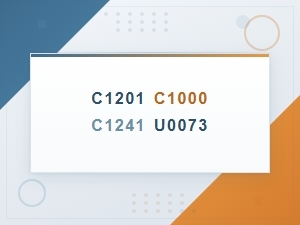 Common Obd-Ii Codes Linked to Steering Rack Failure
 Steering Rack Replacement Check Engine Light Stays on After Fix What to Do
 Can a Bad Steering Rack Cause the Check Engine Light to Come On?