Seeing a steering rack warning light pop up on your dashboard can be unsettling. You might wonder if it's safe to drive, what's actually wrong, and how much it'll cost to fix. Here's the thing before you rush to a mechanic, you can run an OBD-II diagnostic procedure yourself to get a clearer picture of what's going on. This process helps you read the fault codes your car's computer has stored, which narrows down the problem and saves you from guessing. Whether the issue is a failing power steering rack, a sensor glitch, or an electrical fault, knowing how to diagnose it puts you in control.
What Does the Steering Rack Warning Light Actually Mean?
The steering rack warning light sometimes shown as an EPS (Electric Power Steering) icon or a steering wheel symbol with an exclamation mark signals that your vehicle's power steering system has detected a fault. In older hydraulic systems, this might mean low power steering fluid or a failing pump. In newer electric power steering (EPS) systems, the issue could be tied to the steering rack motor, torque sensor, control module, or wiring.
When this light comes on, the car's ECU (Engine Control Unit) or EPS module stores a diagnostic trouble code (DTC). That's where an OBD-II scanner becomes useful it lets you pull those codes and understand what the system flagged.
How Do I Run an OBD-II Diagnostic for a Steering Rack Light?
The procedure is straightforward, even if you've never used a scan tool before. Here's how to do it step by step:
- Get a compatible OBD-II scanner. You'll need a scanner that can read ABS, EPS, and chassis codes not just basic engine codes. Some affordable options handle this well, and you can check out affordable OBD-II scanners that cover steering rack diagnosis.
- Locate your OBD-II port. It's usually under the dashboard on the driver's side, near the steering column. In most vehicles sold after 1996, this port is within easy reach without any tools.
- Plug in the scanner with the ignition off. Turn the key to the "ON" position (or press the start button without pressing the brake) to power the vehicle's electronics without starting the engine.
- Navigate to the diagnostic menu. On your scanner, select "Diagnose" or "Read Codes," then choose the EPS, power steering, or chassis system depending on how your scanner organizes modules.
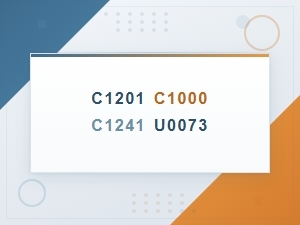
- Read and record all stored codes. Write down every DTC, including pending codes. Common steering-related codes include C-series (chassis) codes like C1241 (low power steering motor voltage) or U-series (communication) codes that point to module issues.
- Check freeze frame data. If available, look at the freeze frame info it tells you the exact conditions (speed, engine load, temperature) when the fault triggered. This context helps narrow down the root cause.
- Clear the codes and test drive. After recording everything, clear the codes, then drive the vehicle for 10–15 minutes. If the steering rack light comes back, the problem is active. If it doesn't return, it may have been a temporary glitch.
What OBD-II Codes Show Up With Steering Rack Problems?
Steering rack issues don't always trigger a single obvious code. The codes you find depend on your vehicle's make, year, and whether it uses hydraulic or electric power steering. Here are some patterns to expect:
- C-series codes (Chassis): These are the most directly related to steering. Examples include codes for steering angle sensor faults, EPS motor failures, or torque sensor issues.
- U-series codes (Network/Communication): If the EPS module loses communication with other modules, you might see U-codes. This often points to wiring problems or a failing control module.
- B-series codes (Body): On some vehicles, the steering system ties into body control modules, especially with integrated stability control.
- P-series codes (Powertrain): Less common for steering, but some vehicles store P-codes if the steering fault affects engine load or emissions-related functions.
If your check engine light is also on alongside the steering light, that combination can tell you something specific about how the faults are connected. This article on what it means when the check engine light flashes then stays solid covers that scenario in more detail.
Why Did My Steering Rack Light Come On After I Replaced Parts?
This is a common frustration. You replace the power steering pump, rack, or sensor, and the warning light stays on. In most cases, the new part isn't the problem the system just needs a recalibration or relearn procedure.
Many electric power steering systems require a steering angle sensor relearn after any rack or column work. Some scanners have a "Special Functions" or "Service" menu where you can run this calibration. If your scanner doesn't support it, a shop with a factory-level tool can do it in minutes.
Also, make sure all codes were cleared after the repair. Stored codes don't always go away on their own, even after the underlying problem is fixed.
Can I Drive With the Steering Rack Light On?
It depends on how the steering feels. If the wheel turns normally and doesn't feel heavy or jerky, you can likely drive short distances while you diagnose the issue. But if the steering feels stiff, pulls to one side, or you hear grinding or whining noises, don't drive the car have it towed.
On vehicles with EPS, a fault can sometimes cause the power steering assist to shut off completely. That makes the wheel very hard to turn at low speeds, which is dangerous in parking lots, intersections, or tight spaces. If this happens, treat it as a no-drive situation.
Common Mistakes During Steering Rack Diagnostics
A few things trip people up when running OBD-II diagnostics on steering issues:
- Using a basic code reader that only reads engine codes. Many cheap OBD-II tools only pull P-codes from the powertrain module. Steering rack faults are usually in the chassis (C) or body (B) module families, so you need a scanner with multi-system capability.
- Ignoring pending codes. Pending codes haven't triggered the light yet, but they hint at problems developing. Skipping them means missing early warning signs.
- Clearing codes without recording them first. Once cleared, some codes take specific driving conditions to come back. If you didn't write them down, you lose valuable information.
- Assuming one code means one fix. Sometimes a single failed component like a bad ground wire triggers multiple codes across different modules. Fix the root cause, not just the first code you see.
- Skipping the test drive after clearing codes. Without a follow-up drive, you won't know if the fix actually worked or if the problem is intermittent.
What Tools and Info Do I Need Before Starting?
Before you plug in your scanner, gather a few things to make the process smoother:
- A multi-system OBD-II scanner (not just an engine-only code reader)
- Your vehicle's year, make, model, and engine type
- Access to a repair database or service manual for code definitions specific to your vehicle generic code descriptions don't always match what the manufacturer intended
- A notepad or phone to record codes, freeze frame data, and observations
- Basic safety gear if you plan to inspect anything under the hood or undercarriage afterward
You can find a more detailed breakdown of scanner options in this guide to affordable scanners for steering rack diagnosis.
What Should I Do After Getting the Codes?
Once you have your trouble codes, take these steps:
- Look up the exact code for your vehicle. A code like C1241 can mean different things on a Toyota versus a Ford. Use a vehicle-specific repair database like Alldata or check manufacturer service bulletins.
- Check for Technical Service Bulletins (TSBs). Some steering rack issues are known problems with specific model years. TSBs tell you the manufacturer's recommended fix and sometimes include updated parts.
- Inspect the obvious. Before replacing expensive parts, check power steering fluid level (if hydraulic), wiring connectors at the rack and column, and fuses related to the EPS system.
- Test, don't guess. Use a multimeter to check voltage at the EPS motor connector or steering angle sensor if the codes point in that direction. Replacing parts without testing is the fastest way to waste money.
- Decide if you can fix it or need a shop. Sensor replacements and wiring repairs are often DIY-friendly. Steering rack replacement or module programming usually requires a professional.
You can find a full walkthrough of the diagnostic process in this OBD-II diagnostic procedure for steering rack light issues.
Quick Diagnostic Checklist
- Confirm the exact warning light symbol on your dashboard
- Plug in a multi-system OBD-II scanner
- Read all stored, pending, and history codes
- Record freeze frame data
- Look up codes using your specific vehicle make and model
- Check for TSBs related to your codes and vehicle
- Inspect fluid, wiring, connectors, and fuses
- Clear codes and perform a 10–15 minute test drive
- Re-scan to see if codes return
- Fix the root cause or schedule a professional repair
Tip: If the steering rack light comes on right after starting the car and then turns off within a few seconds, that's usually a normal self-check. A light that stays on or comes on while driving is the one that needs attention.
 Check Engine Light Flashes Then Stays Solid: Steering Rack Obd-Ii Diagnostic Codes Explained
 Online Consultation for Steering Rack Obd-Ii Code Interpretation
 Common Obd-Ii Codes Linked to Steering Rack Failure
 Affordable Obd-Ii Scanners for Steering Rack Diagnosis
 Steering Rack Replacement Check Engine Light Stays on After Fix What to Do
 Can a Bad Steering Rack Cause the Check Engine Light to Come On?